
Not sure how to integrate the Premium SMS payment method without the payment gateway? Here is the procedure.
💡 GoPay's tip:
If you are interested in Premium SMS without the payment gateway, contact your account manager or the sales department at [email protected].
How to activate Premium SMS without the payment gateway
First you need to report to GoPay the keyword, which is then registered with the operator, then the price level of the Premium SMS and the text of the SMS message. Once the keyword has been registered, the technical integration can begin according to the documentation below.
Example of the text of the SMS message:
Your code for obtaining the service is: xxxxx. Use the code on the portals of xxxxxx. Payment xx CZK via GoPay.
💡 GoPay's tip: The text of the SMS can be at most 128 characters long.
The payment scheme describes a payment made through Premium SMS in what is called the variant without the payment gateway. It is intended for merchants who want to make a service available to customers on the basis of an SMS sent by the user, in such a way that the user does not have to confirm the payment on the side of the GoPay payment system. The result of this communication is an access code that the user receives on their mobile phone and enters on the merchant outlet's side. The service or goods are then made available to them.
Scheme of the Premium SMS payment process without the payment gateway
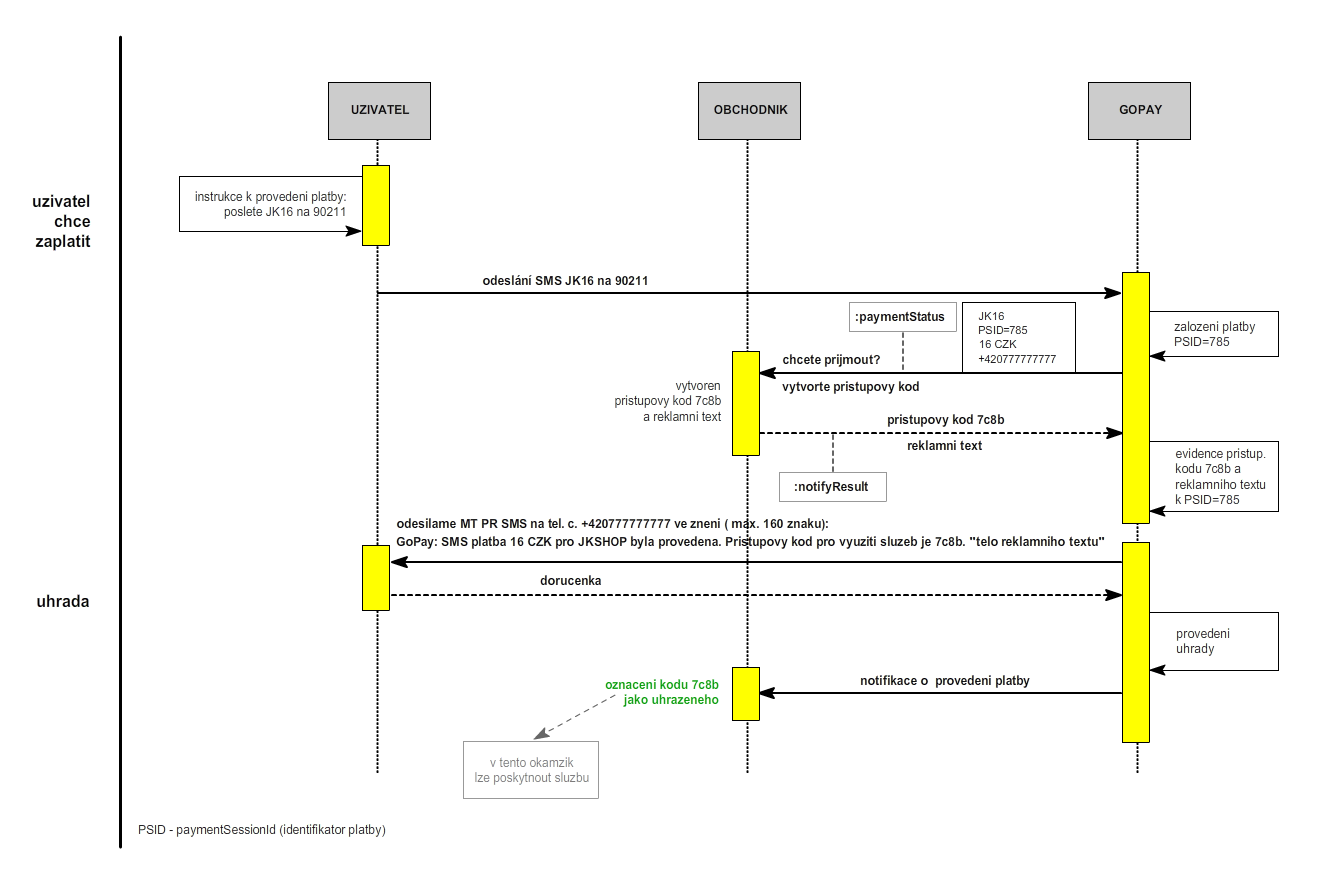
The payment is initiated by the merchant outlet's customer, who follows the instructions and sends a code in a particular form (JK16) to the given telephone number (90211). The payment is then created on GoPay's side and a payment identifier is generated (PSID = 785). In the initial communication, the merchant outlet is informed that a payment has been created from a particular telephone number (+420 777 777 777) with the given code (JK16), amount (16), currency (CZK) and payment identifier (PSID = 785). On the basis of the preceding communication, the merchant generates an access code and an advertising text and sends them back to GoPay. GoPay then sends the customer an MT PR SMS containing the amount and currency (16 CZK) the customer is paying, the access code (7c8b) for using the goods or services paid for, and the body of the advertising text (shortened to the maximum permitted SMS length of 128 characters). Once the automatic delivery report has been received from the customer into the GoPay payment system, a notification about the change in the payment status is sent. The merchant outlet then asks for the payment status and, according to the answer, provides the customer with the given goods or service.
Payment status (paymentStatus)
type: JSON, request
As a result of creating the payment, the GoPay system sends the Payment status (paymentStatus) communication object, which contains the identification of the payment and its parameters. This object is generic and contains several parameters that are not important for this type of payment (they are marked in grey) and do not need to be processed in any way.
Parameter name | Parameter description | Mandatory | Example |
paymentSessionId | Identification of the payment in the GoPay system. | YES | 785 |
parentPaymentSessionId | Identification of the parent payment. Used for recurring payments. | NO | - |
targetGoId | Identification of the merchant outlet / GoPay user within GoPay. An integer identifier defined during the integration of the merchant outlet. | YES | 1234567890 |
productName | Description of the goods/service. | YES | platba jk |
orderNumber | Identification of the order within the merchant outlet. An alphanumeric order designation, max. 128 characters. | YES | JK 16 |
totalPrice | Price of the goods/service in hundredths. An integer expression of the price. Passed when the payment is created. | YES | 1600 |
currency | Determines the currency of the payment. The currency format follows ISO 4217. | YES | CZK |
sessionState | Payment status | YES | PAYMENT_METHOD_CHOSEN |
sessionSubState | Supplementary payment status - the codes represent specific situations: 101 - an online payment method has been selected for payment | NO | 101 |
sessionSubStateDesc | Text description of the supplementary information. | NO | - |
CALL_COMPLETED - the WS call completed without error | CALL_COMPLETED - volání WS proběhlo bezchybně | YES | CALL_COMPLETED |
resultDescription | Description of the error situation in the case of CALL_FAILED | NO | - |
preAuthorization | Indicates whether the payment was created as a pre-authorized payment. | NO | - |
recurrentPayment | Indicates whether the payment was created as a recurring one. | NO | - |
paymentChannel | Determines the payment method the customer selected to make the payment. | NO | always eu_pr_sms |
encryptedSignature | Signature of the payment order. For assembling the string for the signature, see below. | YES | 3d1dd5663487a04f1419929d965238d5973e4728b85ea6c4b5779e438a289437bccbc34e32c0f62d8409f3930765285e |
p1 | Customer's telephone number | YES | +420777777777 |
p2-p4 | Optional parameters | NO | - |
String for the signature
The encrypted signature is assembled from the properties of the payment status. The signature is encrypted with a secret key designated as secureKey, which is passed as part of the integration of the merchant outlet.
String for assembling the signature |
targetGoId+'|'+productName+'|'+totalPrice+'|'+currency+'|'+orderNumber+'|'+recurrentPayment+'|'+parentPaymentSessionId+'|'+preAuthorization+'|'+result+'|'+sessionState+'|'+sessionSubState+'|'+paymentChannel+'|'+secureKey |
{ "paymentSessionId": 785, "sessionState": "PAYMENT_METHOD_CHOSEN", "sessionSubState": "101", "productName": "platba jk", "targetGoId": 1234567890, "orderNumber": "JK16", "totalPrice": 1600, "currency": "CZK", "paymentChannel": "eu_pr_sms", "result": "CALL_COMPLETED", "resultDescription": "", "encryptedSignature": "3d1dd5663487a04f1419929d965238d5973e4728b85ea6c4b5779e438a289437bccbc34e32c0f62d8409f3930765285e"}
Response to the notification (notifyResult)
type: JSON, response
This communication object is passed back to GoPay once the access code and the advertising text for the given payment have been created. The object takes the following parameters.
Parameter name | Parameter description | Mandatory | Example |
paymentSessionId | Identification of the payment in the GoPay system. An integer | YES | 785 |
status | Payment status. Takes the value OK or NOK | YES | OK |
p1 | Access code | YES | 7c8b |
p2 | Optional parameter | NO | - |
p3 | Optional parameter | NO | - |
p4 | Advertising text without diacritics. | YES | Shop with JK Shop. |
encryptedSignature | Signature of the communication element. For assembling the signature, see assembling the string for the signature below. | YES | 09aad1ee4226e96dca490e308fb2a75b39bbb80516f8cf62f0ff5ddee36ae287b21d6f2dd44b298409f3930765285e |
String for the signature
The encrypted signature is assembled from the properties of the payment status. The signature is encrypted with a secret key designated as secureKey, which is passed as part of the integration of the merchant outlet.
String for assembling the signature |
paymentSessionId+"|"+status+"|"+p1+"|"+p2+"|"+p3+"|"+p4+"|"+secureKey |
{ "paymentSessionId": 785, "status": "OK", "p1": "7c8b", "p4": "Nakupujte s JK Shop.", "encryptedSignature": "09aad1ee4226e96dca490e308fb2a75b39bb806516f8cf62f01ff5ddeee36ae287b21d6f2dd44b298409f3930765285e"}
Notification of a change in the payment status works the same way as in the standard integration.
Below is an example of a script in PHP that accepts a request to create a payment and returns an access code. It is only the part of the code demonstrating the communication, without any database access or dynamic code generation.
<?php require_once("config.php"); // soucasti GoPay PHP api 2.5 require_once('gopay_helper.php'); // soucasti GoPay PHP api 2.5 $json = file_get_contents('php://input'); $obj = json_decode($json); if (!$fd) { echo "Error! Couldn't open the file."; } else { $p1 = "TEST P1"; $p4 = "TEST P4"; $status = "OK"; $signature = GopayHelper::encrypt(GopayHelper::hash($obj->{"paymentSessionId"}."|".$status."|".$p1."|||".$p4."|".SECURE_KEY), SECURE_KEY); $res = '{"paymentSessionId":'.$obj->{"paymentSessionId"}.',"status":"'.$status.'","p1":"'.$p1.'","p4":"'.$p4.'","encryptedSignature":"'.$signature.'"}'; echo $res; }?>
The individual steps of integrating Premium SMS without the payment gateway
Once you have been in touch with the sales department and the keyword and price level have been registered, contact us at [email protected].
Please send us the address of the script you have created (as described above), which will handle receiving the request to create a payment.
We will enter the address of the script into the system and confirm its settings to you. After that you can go ahead and test.
You can send a virtual SMS from our simulation terminal.
Enter 90211 as the operator number and your keyword as the text of the SMS message.
Within a few minutes your script will be contacted with a request to confirm the payment. Once the payment has been confirmed and we have received the access code from you, the payment status changes to PAID and an automatic HTTP notification is sent to your notification script. After the notification, you ask for the payment status. If the payment is in the PAID status, the access code can be activated.